
How the Keyword Clustering Agent Works
Add your keywords
Paste a list, or enter up to 3 competitor sites and pick from the keywords they rank for, biggest first.
We check Google for each one
We read Google’s top 10 for every keyword, in the country you choose.
Get one page per cluster
Keywords that share enough of the same results become one cluster: one page to write, with its main keyword, searches, difficulty and intent.
Inside the Keyword Clustering Agent
Real screens from the app, with demo data.
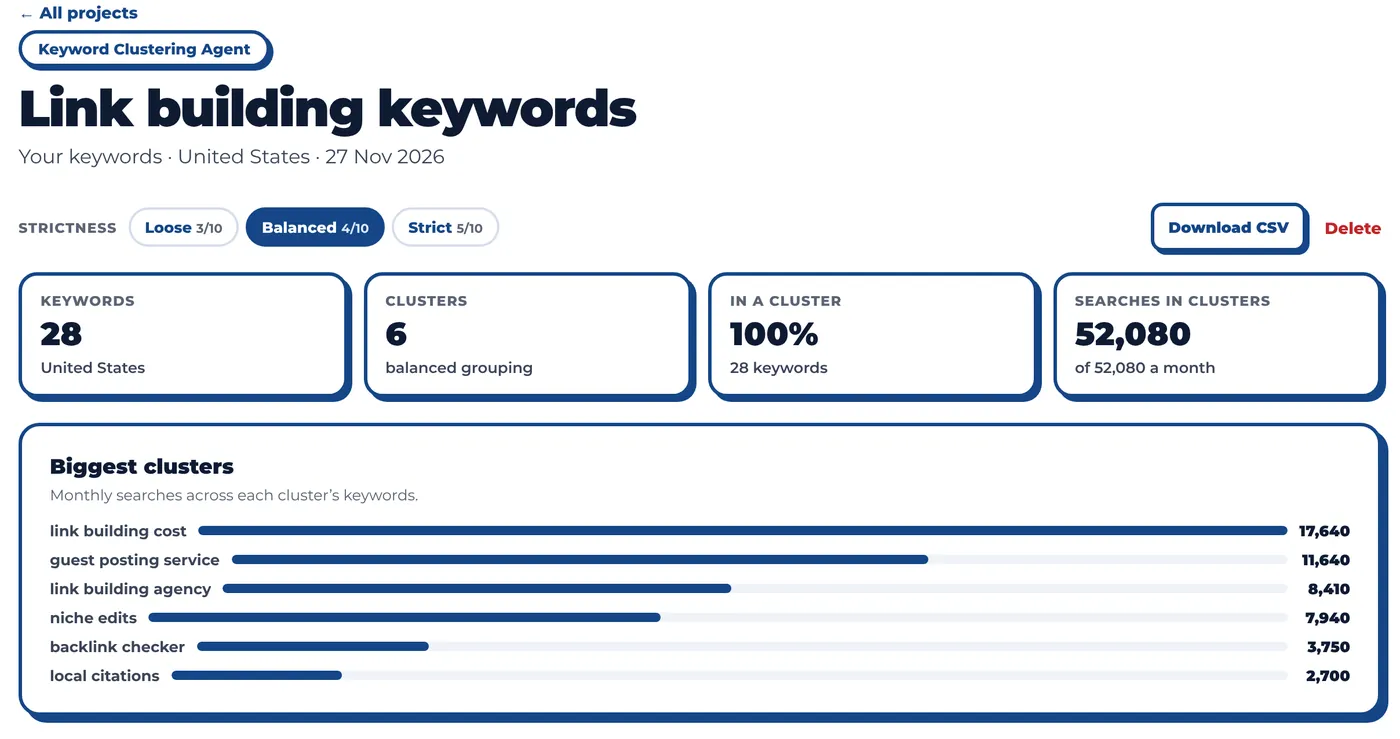
Every cluster, ready to brief
Each cluster shows its main keyword, total monthly searches, difficulty and intent, and every keyword in it with how many of Google’s top 10 it shares with the main one. Below: the pages ranking for most of the cluster, the ones to beat.
- Main keyword, searches, difficulty and intent
- How many top-10 results each keyword shares
- The pages ranking for most of the cluster
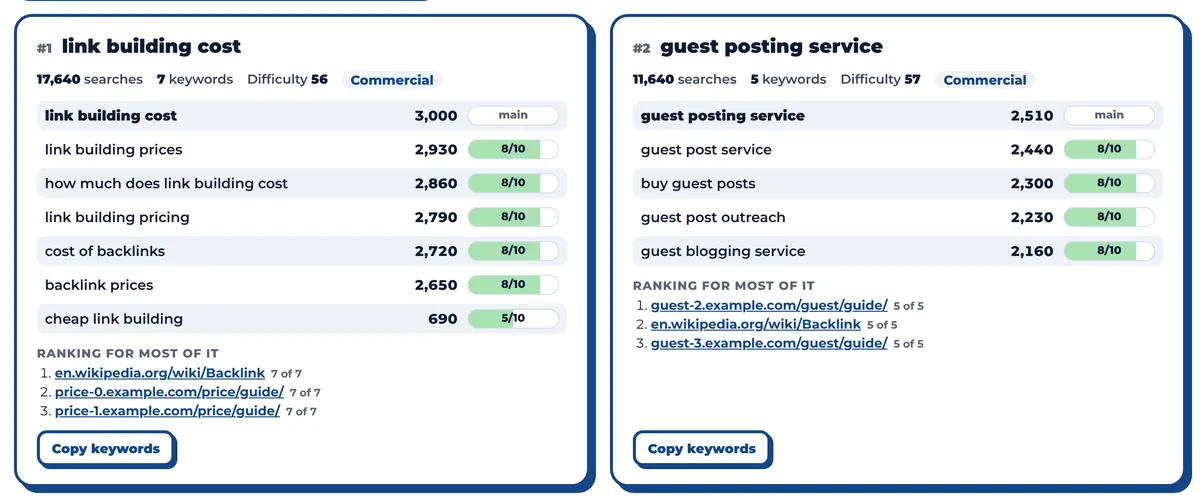
Start from a competitor’s keywords
Enter a competitor’s site and see the keywords it ranks for, with searches, its position, difficulty and intent. Tick the ones you want, and only those are checked on Google.
- Up to 3 competitor sites
- Their biggest keywords first, with the numbers
- You choose what to check, within your plan
Everything in the Keyword Clustering Agent
Google’s top 10, in your country
Clusters from what Google really shows, not from matching words.
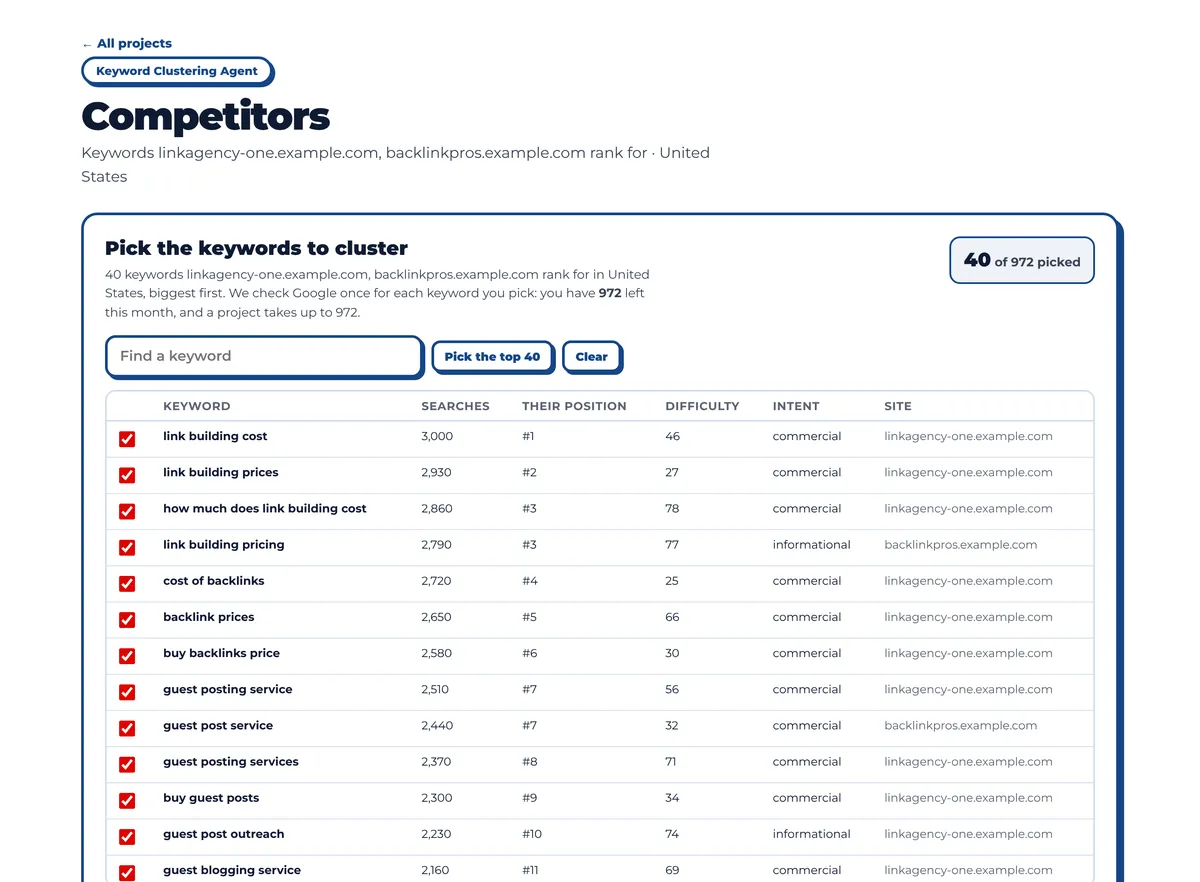
Topic clusters
Each with its main keyword, total searches, difficulty and intent.
Competitors’ keywords
Enter a competitor’s site, see the keywords it ranks for, and pick which to cluster.
Strictness
Strict, balanced or loose: regroup any time, at no cost.
Who ranks now
The pages ranking for most of each cluster.
CSV
Every keyword with its cluster, to plan your pages.
Why Cluster by Google Results?
Two keywords that look different can need the same page, and two that look alike can need different ones. Google decides. When two searches share most of the same top results, Google treats them as one topic, and one page can rank for both.
Clustering by results means each page targets one topic. You avoid two of your own pages competing for the same search, and one page trying to rank for topics Google sees as separate.
Who it’s for
- Content plannersTurn a keyword list into a list of pages to write.
- SEO agenciesPlan a client’s site structure from real Google data.
- Ecommerce sitesDecide which searches need their own category page.
- BloggersGroup a long keyword list into posts that won’t compete.
Free to Start
Free
25 keywords a monthCluster up to 25 keywords: pasted, or picked from a competitor’s. No credit card.
Spend $1,000+ a month with SERPninja
1,000 keywords a monthCluster up to 1,000 keywords a project. Much higher limits on every SERPninja tool. Talk to us.
Keyword Clustering Agent FAQs
Is the Keyword Clustering Agent free?
Yes. A free SERPninja account clusters 25 keywords a month. No credit card.
How are keywords grouped?
By the pages Google shows for them. When two searches share enough of the same top 10 results, one page can rank for both.
Can I use a competitor’s keywords?
Yes. Enter up to 3 competitor sites: we show the keywords they rank for, and you pick which to cluster.
What does strictness change?
How many of Google’s top 10 results a keyword must share with its cluster’s main keyword: 3 (loose), 4 (balanced) or 5 (strict). Change it on the report any time: it regroups the saved results at no cost.
Can I export the clusters?
Yes. Download every keyword with its cluster, searches, difficulty and intent as a CSV file.
Do I need an account?
Yes, a free SERPninja account. Your projects are saved there, and the same account opens every SERPninja tool.
Plan Your Pages From Real Google Results
Free, no credit card. Built by SERPninja: 10+ years in link building, 4.6 on Trustpilot.
Cluster My Keywords